> For the complete documentation index, see [llms.txt](https://documents.vinovathemes.com/furstore-documentation/llms.txt). Markdown versions of documentation pages are available by appending `.md` to page URLs; this page is available as [Markdown](https://documents.vinovathemes.com/furstore-documentation/general-settings/free-shipping-threshold.md).
# Free Shipping Threshold
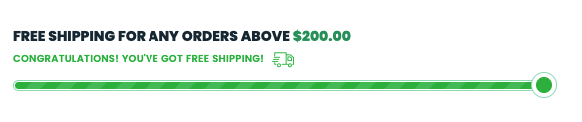
A free shipping threshold is a clever marketing tool that entices customers to add an extra item or two to their shopping cart to reach the minimum purchase, thus increasing average order value.
{% hint style="info" %}
This function can be found in the **Cart popup**, the **Cart canvas**, and the **Cart page**.
{% endhint %}
### 1 - How to customize the "Free Shipping Threshold"
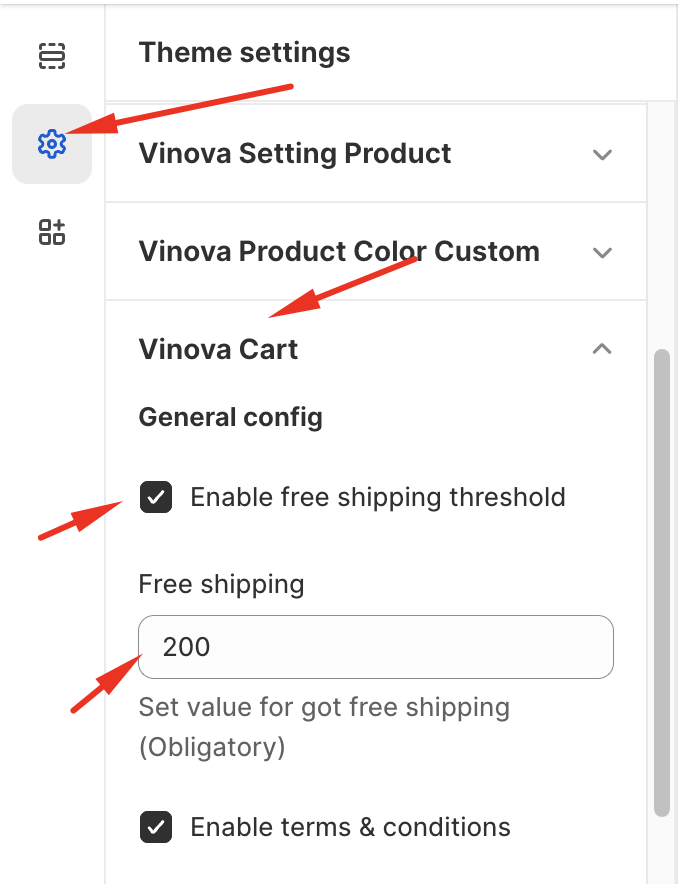
From "**Theme Settings**", click the tab "**Vinova Cart**"
1. **Enable free shipping threshold:** This option allows Enable/Disable this feature
2. Enter the order value for customers to qualify for Free Shipping. In the example, the order value is $200 to qualify for Free Shipping.
3. Click the **"Save"** button to finish.
### 2 - How to change the title, and text content of this function
If you want to change the title, content/description, for example, "FREE SHIPPING FOR ANY ORDERS ABOVE ...", "CONGRATULATIONS! YOU'VE GOT FREE SHIPPING!", "SPEND (value) FOR FREE SHIPPING", please correct this text in "Edit Default Theme Content" which we have a tutorial on the Documentation page or please watch this video:
{% embed url="" %}